
Your first mod
You will make the Destroyer cost $1,500 instead of $4,000. No code: one folder, two small files. Five minutes.
The folder
Section titled “The folder”-
Find your mods folder. The game reads mods from all of these:
Where Path Next to the game mods/beside the executablemacOS ~/Library/Application Support/NukeIslands/modsWindows %APPDATA%\NukeIslands\modsLinux ~/.local/share/NukeIslands/modsiPhone / iPad Files app: On My iPhone > Nuke Islands > Mods Any folder the path in FORGE_MODS_DIRCreate the folder if it is not there. On iPhone and iPad the game makes
Modson first launch; drop.nkpfiles into it from the Files app (AirDrop, iCloud Drive or a cable all work) and restart the game. -
Make a folder for your mod inside it, called
my_first_mod, with this file:mod.json {"id": "my_first_mod","name": "My First Mod","version": "1.0.0","api_version": 1,"author": "you","description": "A cheaper Destroyer."}idis how the game tells mods apart: lower case, digits and_.api_versionis the mod API you wrote for; this game is at 1. The mod.json reference has every field. -
Add the change. Make a
datafolder and putships.jsonin it:data/ships.json { "patch": { "destroyer": { "cost": 1500 } } }The file name is the kind of data you change.
patchchanges fields of a record that exists: here thecostofdestroyer. Every other field keeps its value.Directorymods/
Directorymy_first_mod/
- mod.json
Directorydata/
- ships.json
See it
Section titled “See it”Mods load once, when the game starts. Quit the game completely and start it again.
From a source checkout, point the game at your folder:
FORGE_MODS_DIR=$PWD/mods ./target/release/forge game/nukeislandsThe log (the terminal the game runs in) shows one line per VM:
[mods] server: 1 of 1 active (my_first_mod 1.0.0)[mods] client: 1 of 1 active (my_first_mod 1.0.0)The title menu now has a MODS entry. It only appears when a mod is installed.

Start a match, build a Dock and open SHIPS. The Destroyer’s price is the one you set:
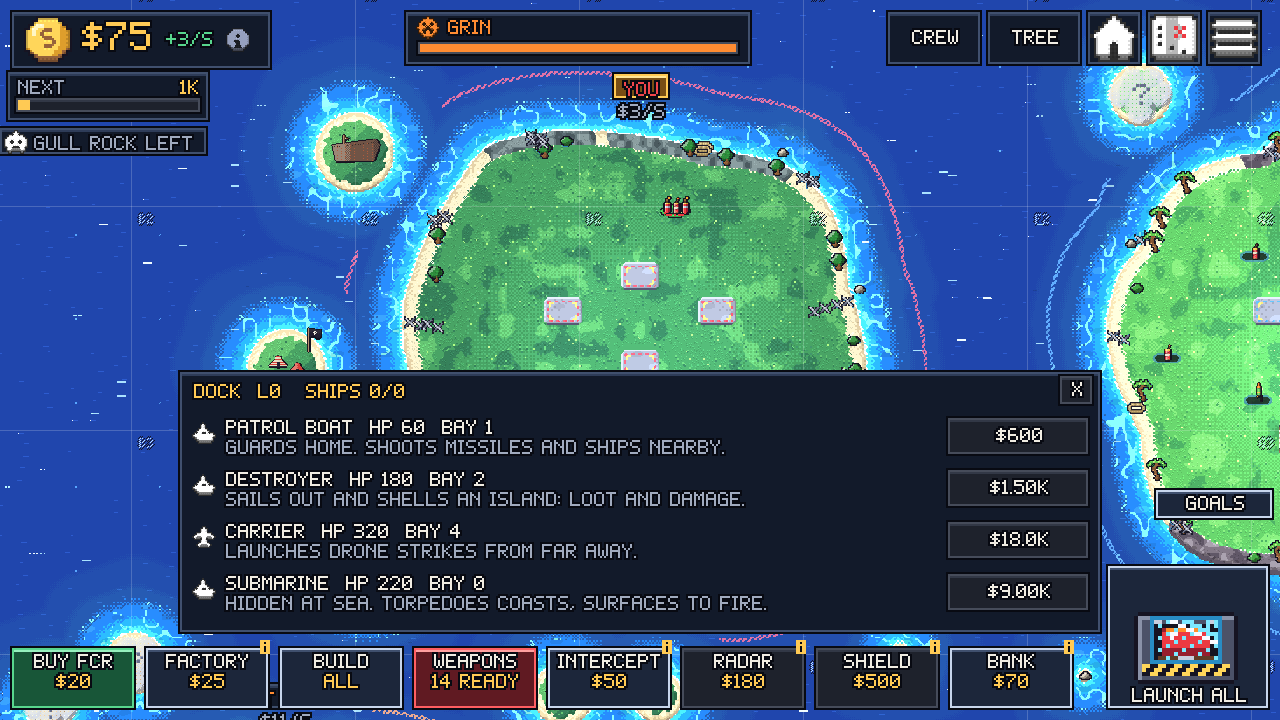
Break it on purpose
Section titled “Break it on purpose”Change the cost to text:
{ "patch": { "destroyer": { "cost": "cheap" } } }Restart. The game starts normally, without your mod. The MODS page says why:

The log has the whole message, with the file, the kind, the record and the field:
data/ships.json: ships.destroyer.cost: expected a numberEvery field has a type and a range, listed in the ships reference. A value outside them is an error, not clamped. When a mod fails, look up its message in Troubleshooting.
Put the number back before you go on.
The same thing in Luau
Section titled “The same thing in Luau”Data files cover most changes. When you need logic, add main.luau. It runs once at start with a mod global. This version changes three fields in the JSON file and prints the result from Luau:
{ "patch": { "destroyer": { "cost": 1500, "speed": 45, "damage": 40 } }}-- Runs once at start, in the server VM and again in the client VM.local d = mod.data.get("ships", "destroyer")mod.log("destroyer now costs", d.cost, "and sails at", d.speed)The log shows the line twice, once for each VM:
[mod:my_first_mod] destroyer now costs 1500 and sails at 45[mods] server: 1 of 1 active (my_first_mod 1.0.0)[mod:my_first_mod] destroyer now costs 1500 and sails at 45[mods] client: 1 of 1 active (my_first_mod 1.0.0)Why twice: the game runs the rules in one Luau VM and the screen in another, and your script runs in both. Two VMs explains it. Next, a mod with logic in it: your first superweapon.